
Apex Legends Communication Revolution: Voice & Text Chat Secrets for 2025 Domination
Master Apex Legends communication with expert audio settings and accessibility features like 'Enable Accessible Chat Features' to dominate the battle royale arena. Unleash simultaneous text and voice chat for flawless squad coordination.
Can you imagine dropping into a chaotic Apex Legends match in 2025 without the ability to call out a flanking Revenant or request a desperate shield battery from your Bloodhound teammate? In the hyper-competitive arena of Respawn Entertainment's legendary battle royale, where twenty trios clash for supremacy, information is the ultimate currency. The difference between a glorious victory and a humiliating defeat often boils down to a split-second callout or a perfectly timed request for revival. While the shrinking ring forces the action, it's seamless communication that forges champions. But what if the standard voice chat fails you? What if you need to adapt to ever-evolving squad dynamics? Fear not, legends, for the game's accessibility and audio settings hold the keys to unlocking communication mastery beyond your wildest dreams!

🎤 Unleashing the Power of Accessible Chat
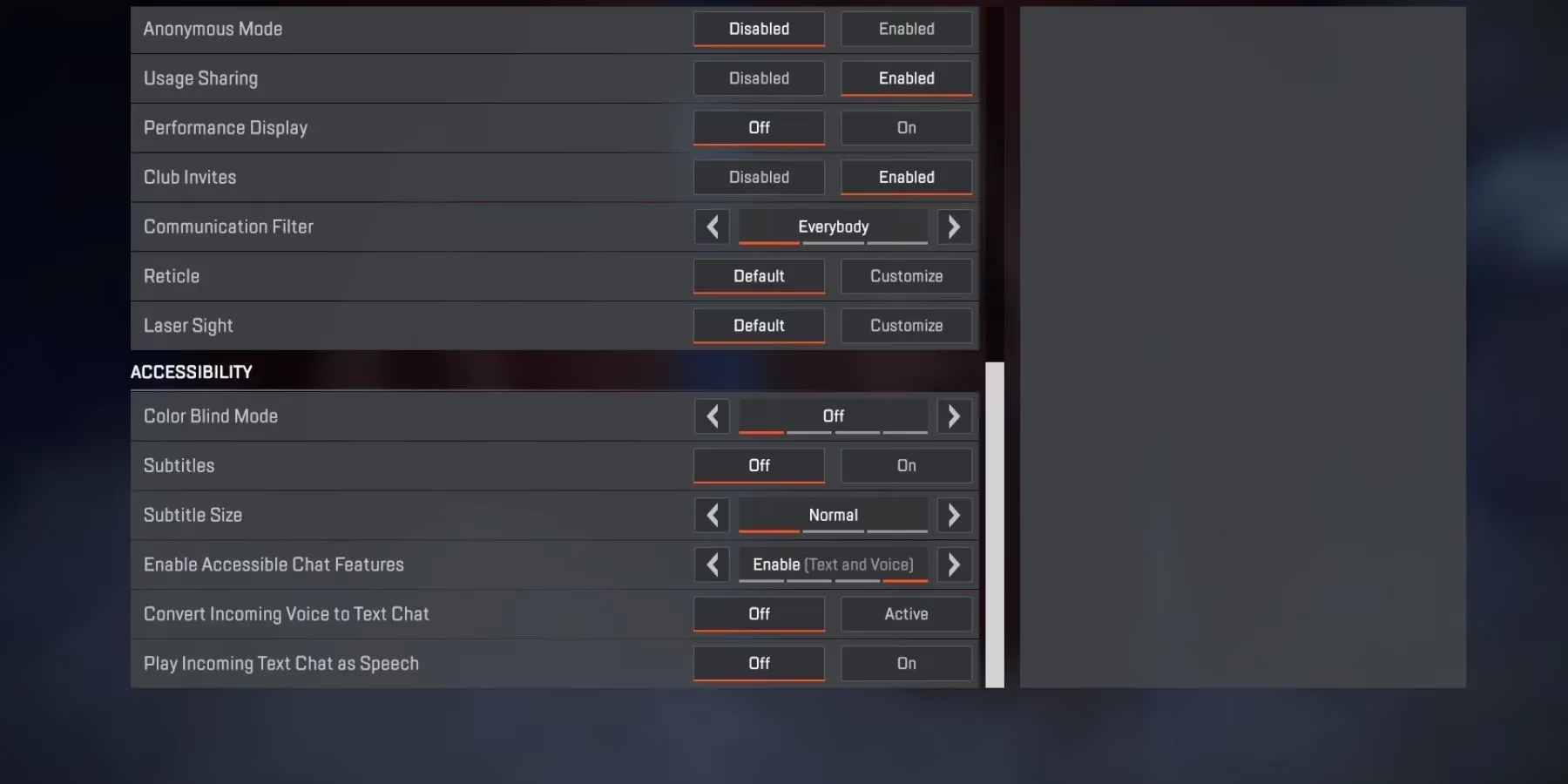
Forget everything you thought you knew about in-game comms. The true game-changer lies buried within the Settings menu, under the often-overlooked 'Accessibility' section. Here, you will find the holy grail: 'Enable Accessible Chat Features'. Activating this is not just an option; it's a declaration of war on miscommunication. This single toggle unleashes a dual-wielding communication beast, allowing you to send and receive both text AND voice chat simultaneously. But why stop there? The system's true genius allows for incredible customization:
-
Hear Your Teammates' Typing: Enable 'Play Incoming Text Chat as Speech'. Suddenly, that frantic "HELP!" typed by a teammate who can't use their mic is broadcast directly into your ears as verbal speech. No more missing crucial info because you were focused on a fight! 🎧
-
See Your Teammates' Screams: Activate 'Convert Incoming Voice Chat to Text Chat'. Every shout, every callout, every bit of toxic rage from that random teammate is transcribed into text right on your screen. It's like having a personal stenographer for the chaos!
🔊 Mastering Your Microphone: Push to Talk vs. Open Mic
How you transmit your voice is a strategic choice. Do you want the precision of a sniper or the constant flow of an LMG?
| Recording Mode | Activation Method | Best For | Potential Downside |
|---|---|---|---|
| Push to Talk | Hold the 'T' key | Competitive play, avoiding background noise | Can be slow in frantic moments |
| Open Mic | Automatically transmits sound | Fast-paced, constant communication | May broadcast unwanted background noise |
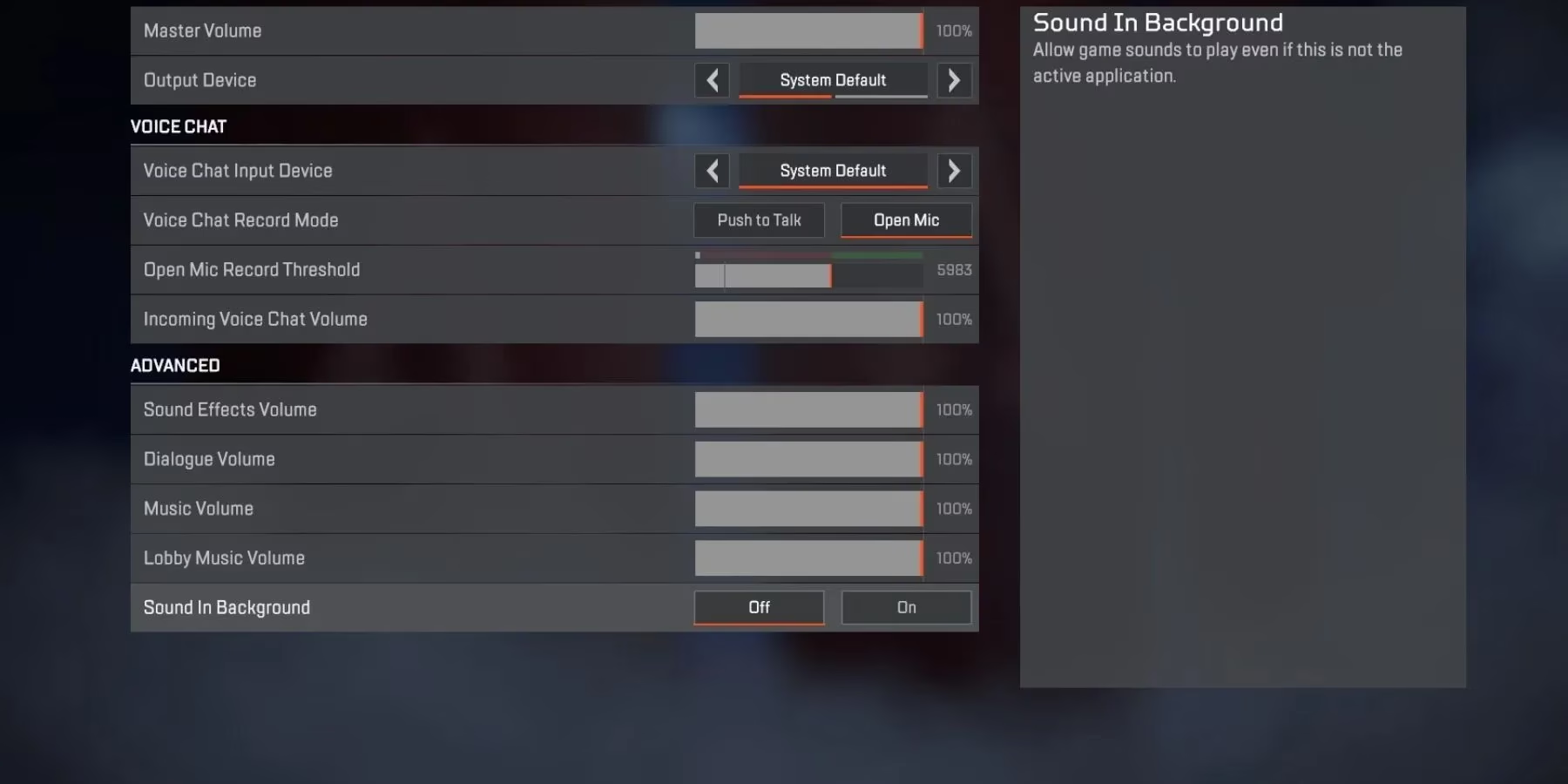
Navigate to the 'Audio' settings and find 'Voice Chat Record Mode' to make your choice. But the customization doesn't end there! Under the 'Advanced' audio options, you can fine-tune your auditory experience to perfection:
-
Dialogue Volume: Crank up those Legend quips and mission updates.
-
Music Volume: Lower it to focus, or pump it up for hype!
-
Sound Effects: This is crucial—hearing footsteps and reloads can save your life.
-
Lobby Music: Because even legends need a vibe check before dropping.
🤫 The Ultimate Power: Controlling Your Squad's Noise
Let's be real—not every random teammate in 2025 is a communication virtuoso. Sometimes, you need to take control. Muting a problematic player is simpler than landing a headshot with a Wingman. Just open your inventory, navigate to the 'Squads' tab, and click the 'Speaker' icon beneath that player's profile. Instant peace. ✨
But what if you want to enter a zen state, free from all human vocal interference? Go nuclear. Head to Settings, find the 'Gameplay' section, and locate the 'Disable Voice Chat' option. Activate it, and you've created a silent, focused sanctuary. The beauty? You can re-enable it anytime you crave that chaotic human connection again.
🎮 Platform Universality & The Future of Comms
This communication arsenal is available to every legend across every platform in 2025: PC, PlayStation, Xbox, and Nintendo Switch. The battlefield is level. The tools are in your hands. Are you still relying on basic pings and hoping for the best? In today's Apex Legends, that's like fighting with a Mozambique against a squad full of Krabers. The evolution of chat features—from simple voice to this interconnected system of speech-to-text and text-to-speech—represents a fundamental shift. It's no longer just about talking; it's about ensuring every possible piece of information is received, no matter a player's preferred method or situational limitations.
Embrace these tools. Master your microphone mode. Harness the power of accessibility features not as an aid, but as a tactical advantage. Configure your audio to hear the faintest shield crack or the most distant zipline. Because when the ring is small and three squads remain, the team that communicates with flawless, adaptable clarity doesn't just have an edge—they've already won the fight before the first bullet is even fired. So, legend, the question isn't if you need these settings. The real question is: can you afford to drop into the arena without them? 🔥