The Ultimate 2025 Guide: Changing Language and Server in Apex Legends
Master Apex Legends in 2025 by optimizing language and server settings for a seamless, immersive battle royale experience across all platforms.
Picture this: you're dropping into the vibrant, chaotic world of Apex Legends, ready to outplay and outlast every other squad on the map. The fast-paced action, the unique abilities of each Legend, the thrill of being the last team standing—it's an experience that has captivated millions globally. But what if the on-screen text feels like an alien language, or your shots are hitting a fraction of a second too late because of server lag? In the interconnected world of 2025's gaming landscape, personalizing your experience is key. For players from Tokyo to Berlin, São Paulo to Seoul, understanding how to tweak the game's language and server settings isn't just a convenience; it's a gateway to a smoother, more immersive battle royale journey. Let's break down exactly how to make Apex Legends truly speak your language and play by your rules.

Speaking Your Language: A Platform-by-Platform Guide
Apex Legends casts a wide net, available on everything from powerful gaming PCs to sleek next-gen consoles. Naturally, the path to changing the in-game language isn't a one-size-fits-all deal—it dances to the tune of your platform. Here’s your cheat sheet for 2025:
On PC (Steam):
This is where the PC master race gets to flex a little. The process is pretty straightforward, honestly.
-
Fire up your Steam client and head to your Library.
-
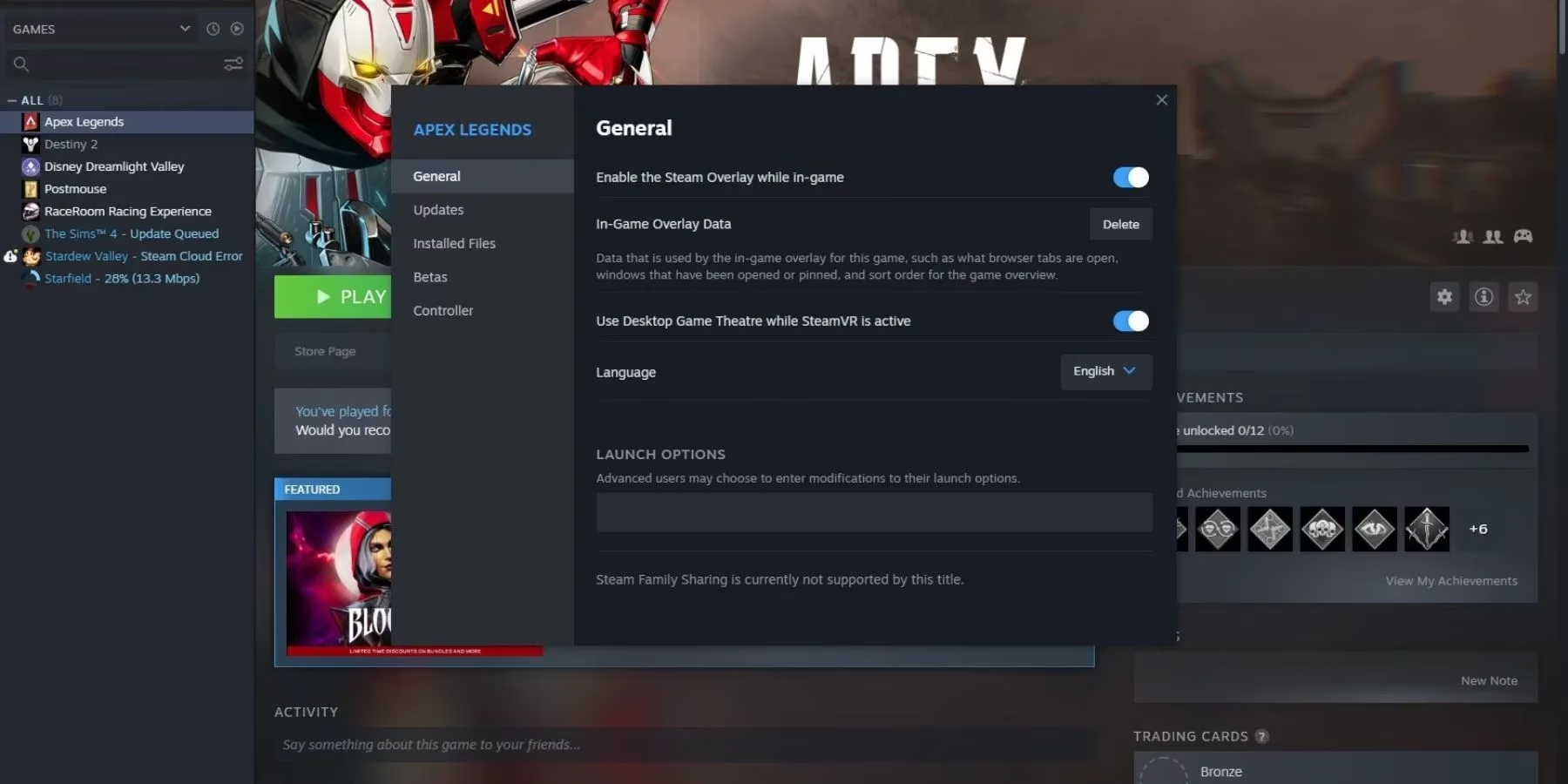
Find Apex Legends in your list, give it a right-click, and select 'Properties'.
-
In the window that pops up, navigate to the 'General' tab.
-
You'll spot the 'Language' dropdown menu. Give it a click!
-
By default, it's set to English. Simply select your preferred tongue from the list, and Steam will handle the rest, downloading any necessary language packs automatically.
On PC (EA App):
With Origin fully sunsetted, the EA App is now the hub for all things Electronic Arts, including our beloved Apex.
-
Launch the EA App and go to 'My Collection'.
-
Click on Apex Legends, then look for the little Gear icon (Settings) usually found near the 'Play' button.
-
Select 'Manage' and then find the 'Language' option.
-
Choose your desired language and apply the changes. The app might prompt for a quick update.
On PlayStation (PS5/PS4):
Console players, your method is tied directly to the system itself.
-
From your PlayStation's home screen, go to Settings (the gear icon).
-
Scroll down and select 'System'.
-
Click on 'Language' and then 'Console Language'.
-
Pick your language. Your PS5 will restart, and Apex Legends will boot up in the new system language. Easy peasy!
On Xbox Series X|S / Xbox One:
Microsoft's ecosystem offers a similarly system-wide approach.
-
Press the Xbox button on your controller to open the guide.
-
Go to Profile & System > Settings > System > Language & location.
-
Change your 'Language' here.
-
Restart your console, and voilà—Apex will follow suit.
On Nintendo Switch:
For those championing the portable arena, the steps are familiar.
-
From the Switch Home Menu, select 'System Settings'.
-
Scroll down on the left menu and choose 'System'.
-
Select 'Language' to set your console language.
-
A restart later, and you're good to go.
The Global Lexicon: What Tongues Does Apex Speak?
Respawn Entertainment hasn't left any major player base behind. As of 2025, Apex Legends supports a robust roster of languages, ensuring you can catch every quip from Mirage or every tactical call from Bloodhound in a familiar dialect. The supported languages include:
| Language | Code/Note |
|---|---|
| English | Default & Full Audio |
| Japanese | 日本語 |
| German | Deutsch |
| French | Français |
| Italian | Italiano |
| Spanish | Español |
| Korean | 한국어 |
| Chinese (Simplified) | 简体中文 |
| Portuguese (Brazil) | Português do Brasil |
| Russian | Русский |
| Polish | Polski |
It's worth noting that while text and subtitles are fully translated for all these, full voice-over acting is primarily available for a select few like English, Japanese, and German. The others get you all the menus and item descriptions in your language, which is still a massive help!
Finding Your Digital Home: The Server Change Saga
Alright, so you've got the language down. But what about when your game feels... sticky? When you pull the trigger and there's that horrible delay before the shot fires? That, my friend, is often a server issue. Luckily, Apex Legends gives you the power to choose your battlefield. Changing your server region can be the difference between a frustrating match and a buttery-smooth victory.
Here’s the lowdown on how to shop for the best server:
-
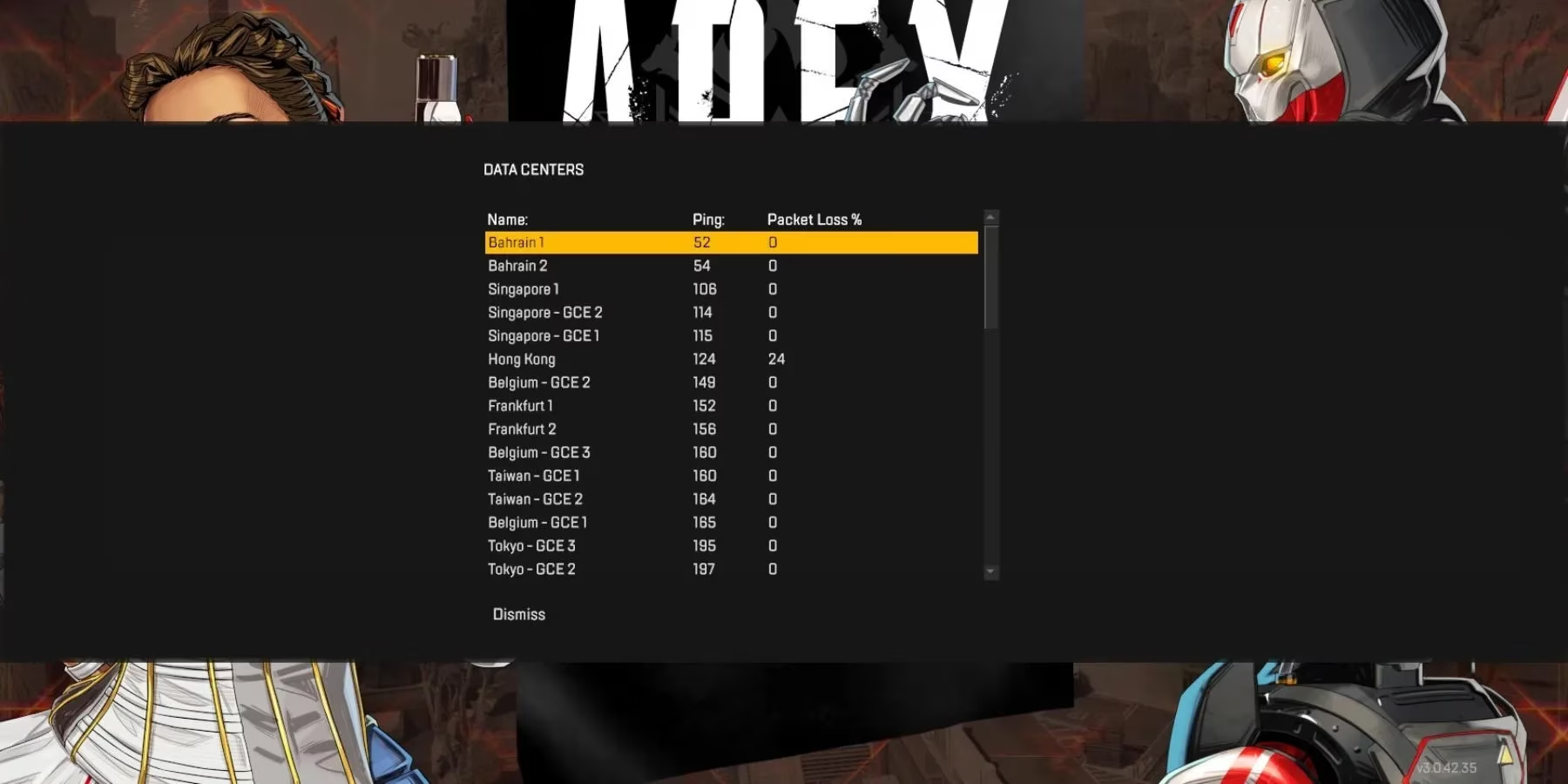
From the main menu of Apex Legends (before you click 'Ready'), look at the bottom of the screen. You should see a prompt for 'Data Centers' or something similar. On most platforms, you can also access this by waiting on the title screen for about a minute.
-
Click it. You'll be presented with a glorious list of servers from all over the globe—from Salt Lake City to Sydney, Amsterdam to Tokyo.
-
This screen is gold. It doesn't just show server names; it shows two critical stats:
-
Ping (ms): This is your latency, the round-trip time for data between you and the server. Lower is always better. Think of it as your reaction time's best friend.
-
Packet Loss (%): This shows the percentage of data packets getting lost in transit. You want this to be 0%. Anything higher can cause rubber-banding or warping.
-
Pro Tip for 2025: Don't just blindly pick the geographically closest server. Sometimes, due to internet routing, a server one country over might have a better, more stable connection. Always pick the server with the lowest ping and 0% packet loss for the smoothest gunfights. Your K/D ratio will thank you later.
Why Bother? The Impact on Your Game
You might be thinking, "Is all this tweaking really worth it?" In a word: absolutely. Here’s why taking these five minutes to set things up is a game-changer:
-
Comprehension is Key: Understanding every ability description, weapon attachment, and battle pass challenge instantly makes you a more effective player. No more guessing what that hop-up does!
-
Cultural Comfort: Hearing the Legends' banter or reading the lore in your native language adds a whole new layer of immersion and connection to the game's world.
-
Competitive Edge: A lower ping server isn't just about comfort; it's a legitimate competitive advantage. In a game where milliseconds decide who knocks whom, a stable 30ms ping versus a shaky 120ms ping is a huge deal.
-
Playing with Friends Abroad: If your squad is spread across different continents, you can mutually agree on a server that offers the best average ping for everyone, ensuring no one is at a severe disadvantage.
So, whether you're a seasoned Apex Predator or a fresh-faced rookie just dropping into Kings Canyon for the first time, taking control of these settings is your first step toward mastering the game. It’s about removing barriers—both linguistic and digital—so all that's left is you, your squad, and the fight for that glorious Champion screen. Now get out there and show them what you're made of! The arena awaits, in your language, on your terms.